How to make something complicated
I would consider myself a relatively novice programmer, as far as programmers go. It's not that I haven't dabbled or tinkered throughout the years but given that the vaaaaast majority of my github commits are in gdscript, I think that alone demonstrates where I'm at. What I'd like to discuss is the thought process and overall design I worked through in making a relatively convincing CPU opponent that would challenge more or less everyone, if not defeat them outright when set to the highest difficulty.
The first problem is the decision space: Puzzle Touchdown is played on a relatively freeform grid where you can move anywhere; where key assumptions about the value of moves, how you move, and what actions cost can change; and where actions can have unpredictable expected values. That's! A lot!! To worry about!!!! From the start, when approaching this problem, I figured the most important strategy we could use was Minimax, and the reason was pretty straightforward: by developing an offensive algorithm that created the greatest expected value (yards), we could use that algorithm to identify the most valuable moves and prevent them on the cpu player's defensive turn. The possibility of reusing code for different gameplay modes was immediately appealing to me and seemed like a great place to start.
The next step was to determine the relative value of moves. To achieve this, I created custom classes that inherited from the game's own grid and piece classes: that way I could reuse code from the game grid to simulate the results of different behavior, like how much a swap might be worth. The purpose of using inheritance here is twofold: by inheriting instead of directly duplicating code, I reduce the amount of code footprint I have to maintain and keep up to date (important, as my time is constrained), and I can alter the code as needed to reduce its performance costs. The customized version of the grid and pieces don't have any particular need to use the node tree or draw anything on the screen, so replacing them as refcounted objects (a very generic class with little overhead) instead of nodes on the Godot Scene Tree was one way to save on performance.
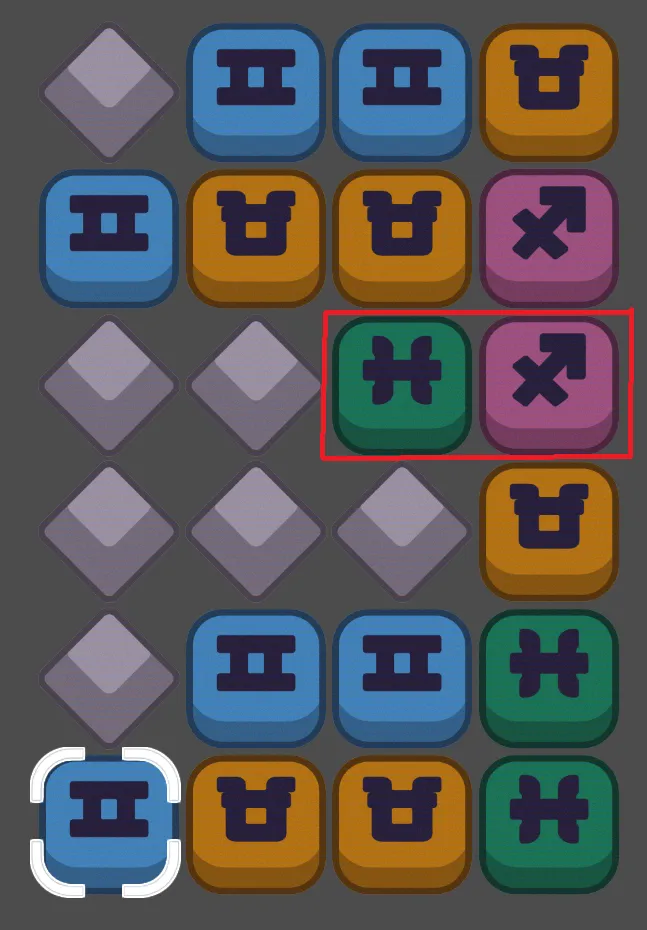
From here the next step when calculating a move for the cpu player is pretty straightforward: simulate every possible swap on the board, rank them based on how many yards they generate (or no longer generate if blocked), and then, if that move would be 15 or greater (granting a first down), the cpu player would make that move. This is what we would consider the most conservative line of gameplay: it ensures the cpu player never fumbles the ball, but reliably advances down the field. If there's truly a juicy move on board, it can identify it quickly and pursue it. Notably, we do not have to test literally every swap, only every upward and rightward swap from the bottom-left corner to the nearly upper-right corner, because the opposite swaps are symmetrical and identical, giving us an easy optimization.
Navigating a board with random gaps in it was kind of a challenge because I'm kind of an inexperienced dweeb; I'm sure someone more intelligent out there knows how to easily integrate A* pathfinding into our grid system (Godot even has a node specifically for this), but I didn't and did not think that it was necessary. The strategy I chose (stepping towards a destination one step at a time) made a lot of sense in a game without obstacles, but Puzzle Touchdown does have gaps in the board that can generate cyclic behavior as the cpu player tries to navigate towards its destination. Stamping out that cyclic behavior was a not insignificant expenditure of my time, and, if I'm being honest, the worst part about guarding against this behavior is that I didn't and still don't have a particular test to ensure it doesn't happen in a weird circumstance (we'll get to testing later).
There are a few more behaviors that I needed to implement at this point, and chief among them was making the cpu player create chains, not merely score them. In Puzzle Touchdown, adding a link to a chain gives you more yards than if you had simply made a clear elsewhere on the board, and players need to be told this fact, they need to feel this fact, and they need to see the cpu player demonstrate this fact. In order to get the computer to create chains, if there wasn't a move on the board that would lead to an imminent first down, the computer will then test all swaps on the resulting board of any given swap, and sum the values of the two swaps together. So in other words, if the computer saw a move that was worth nothing, but the resulting board created a move worth 9, then it would value the original move as nine. Those of you with a little bit of math would probably sense that this is an exponentially larger space to search for a move, and you'd be right. It's also true that we could spend a lot of time optimizing the search to not recalculate the same regions of the board over and over again.
I opted...to not bother optimizing! I naively search through the grid over and over again because it's so simple to write. While it's true that executing a complicated search in gdscript will block the main thread, suspending animations and overall looking kinda janky, pushing the search off into its own thread ensures that gameplay animations persist while the computer calculates for the <0.25 seconds it takes to perform this task. If there is no performance problem for the user, if the problem is adequately solved, and it opens up the schedule for me to resume my other tasks, I would consider that a success no matter how much room there is for optimization. In fact, I would argue that my core programming strategy is optimizing not for performance but my ability to finish in time without any sweat.
Finally, the last major feature was for the cpu player to use their team powers. Puzzle Touchdown grants every team their own unique power plus a shared power they could use instead. There were...many more planned instead, but the majority of those were cut because our design standards (for this game at least) were for powers to be summarized in a sentence, and for there to be a strongly obvious visual component that communicated what the power did and how it worked. That's great from a human useability standpoint, but it's actually kind of hell for a computer programmer, because the design space for powers is dominated by things computer opponents kind of struggle with, such as understanding the spatial nature of the board holistically.
There couldn't be a unifying algorithm for using powers, instead, any time the computer opponent would be searching for an empty swap to build a chain, it would also attempt to simulate consuming a power charge. We would perform an early return in various situations, such as if it were illegal to use a power, or if a power was already used and the cpu would be blowing through its resources, and then simulate the power being used across the board, so we could plug the expected value back into our original minimax function. For some powers, like Wild Card or Glitch, this is reasonably straightforward, but persistent effects like Slime Trail or Double Team require wholly new branches of the move-building-and-searching algorithm. The latter is still, at time of writing, under active development.
The amount of bugs and problems that occurred during development of these features cannot be understated, but at least the environment I worked in was very good. Godot's IDE by default makes programming pretty easy because any time an exception occurs, it zooooooooms in to where an unexpected result occurred and tells you how airheaded you are. In addition, you can set breakpoints and step through code directly if you have any trouble, so you can directly inspect the call stack, its variables, as well as the variables contained within any component in the node tree. Very convenient!
Where this created hell for me is that, fundamentally, I was (am?) missing foundational skills more experienced programmers have. The cpu_player class is big, complicated, not particularly modular, and by design enters into a lot of wholly unique scenarios that I simply cannot plan for, at least in their entirety. Moreover, the cpu player was created somewhat early on in the development cycle for puzzle touchdown, so a lot of the assumptions about how code should be organized, how data should be structured, etc, were just, overall, quite poor. This made debugging kind of a chore for me for a very long time, because I passively waited for bugs or exceptions to be handed to me to go fix, and then sweat endlessly as I struggled to reproduce the context in which they occurred. Earlier in the project I tried to create a testing environment and largely failed, mostly because I failed to really hammer out what I specifically wanted from it. I had to spend some time performing other maintenance anyway, until I was ready to return to this set of features.
I returned to the cpu player class after about six months away from it, and decided to simply do a top-to-bottom refactor in combination with a new testing suite. Gone were nested dictionaries and unlabelled arrays, and in were classes with named fields (I suppose "struct" would be the language used outside of gdscript). This made the code much more readable and easier to understand, and honestly easier to write too, because the IDE can autocomplete the property fields of a class, but won't do the same for, say, a dictionary's key which you defined earlier.
And I created a much better testing environment! It's complete with the original game components, so the cpu player is being tested on the components it interacts with in-game. I don't know exactly how unit testing occurs in other studios or environments, but my method has been to:
Configure an environment as similar as possible as the one used in game
Create automated tests that will load all relevant data, then prompt the cpu player to act as if it were in a game
Verify that the cpu player's behavior and, importantly, all information about state within the environment and within the cpu player is what we expect.
I have dramatically improved the behavior of the cpu player, its strategy, and its reliability by taking this approach. The tests themselves are pretty straightforward: loading data, prompting the AI player to make a choice, and then using assert statements to catch whether or not the resulting arguments and state is what we expect. The programming process was surprisingly painless and allowed me to step through each leg of the feature's code without having to do deep dives in breakpoint hell. These changes will be folded into the next version of the demo, whenever that transpires; I'd like to wrap all of the cpu_player features before signing off on it, and obviously do more targeted QA.
I hope you enjoyed reading, and I'm very excited to continue to work on Puzzle Touchdown; it's been quite the battle, but the adversity has been largely constructive, and I'm grateful for that opportunity.